
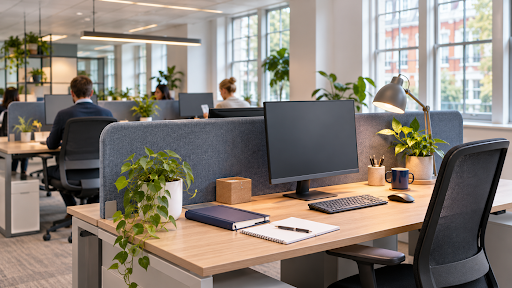
How Office Desk Privacy Screens Improve Focus Productivity
There’s often quite a lot going on around you at an open-plan desk, despite others appearing to be hard at work. Colleagues talking, seeing others pass by, etc. will all take your mind away from what you’re working on.
Desk screens can be used to create some level of privacy around a shared desk, avoiding the need for fully enclosed cubicles or offices. Selecting the type and location of the screen will determine its effectiveness.
What You’ll Learn
- Lack of Focus at Shared Desks
- Benefits of Privacy Screens
- Which Privacy Screen to Use?
- Where to Place a Desk Privacy Screen
- Supporting Good Focus Practices
- Summary
Lack of Focus at Shared Desks
Interruptions aren’t just from colleagues stopping to ask you questions, but from others simply passing by, or the awareness that others can read/see your desk (e.g. a file you don’t wish others to view).
As a result, people may struggle to focus, or may need to take extra time to arrange things to their liking before they begin working.
This was highlighted in the Gensler Research Institute’s 2026 report, which found that 1 in 4 employees reported DIY fixes for ergonomics, temperature or visual privacy, across 16 countries. Whilst this does not comment on desk privacy screens, it highlights that many will attempt to resolve shortcomings in their workplace, where possible, themselves.
Providing a degree of visual barrier at the desk could therefore go some way towards addressing some issues, allowing staff to concentrate, without isolating them completely.
Benefits of Privacy Screens
Privacy screens at a shared desk can reduce line-of-sight, blocking the sight of those walking by, or reducing visibility to others at adjacent desks (i.e. from viewing your computer, files, etc.).
A variety of office desk privacy screens, such as fabric, acoustic and perspex screens are available from ECO Manufacturing, which can be suited to varying degrees of privacy required, depending on your office environment.
Note, providing visual privacy should not be interpreted as sufficient for confidential data, with appropriate offices, privacy screen technology, etc. implemented as necessary, along with controls to mitigate risk of verbal disclosure, etc.
Depending on the design, desk privacy screens can provide some attenuation of speech, limiting how far it carries, but a non-acoustic screen/perspex panel should not be relied upon to significantly reduce noise.
It’s also suggested that screen positioning can have an effect on speech, with a 2024 study finding the poorest measured speech privacy in face-to-face layouts using larger office partitions, however, the variations were not shown to be significant, nor can it necessarily be extrapolated to smaller scale privacy screens, or used as a sole solution to noise.
Which Privacy Screen to Use?
To avoid over-complicating or impeding the use of a desk, identify what factors are leading to people’s distraction, and select the privacy screen to address that issue. Incorrect selection could lead to an additional hindrance to using the desk.
Common options include:
- Fully opaque screens – e.g. to limit visibility of others, passers-by, create separation, etc.
- Acoustic privacy screens – where noise from adjacent desks may be a factor, verify the properties of the screen, as some fabric screens may be designed to reduce noise, others will not.
- Translucent/frost privacy screens – to offer an element of privacy, without overly disrupting the flow/feel of the office environment
- Perspex privacy screens – where a physical barrier is desired, but sightline visibility is required, although will not be effective in preventing others viewing your desk or limiting speech
Screen height will also need consideration, with lower screens concealing desk contents, but possibly allowing passers-by to see over, and higher screens limiting sight-line to colleagues, or those further afield.
You should also consider the nature of work carried out, and whether those desks should be afforded less visibility from one another, e.g. admin staff, compared to other colleagues sitting adjacent. There may be no requirement to install privacy screens on all, if applicable.
Where to Place a Desk Privacy Screen
Placing a privacy screen incorrectly may negatively impact a person’s ability to use their desk, obstruct natural light, restrict visibility, or interfere with, e.g. a monitor mount, etc.
Consider where the majority of the disturbance originates from, e.g. people passing on one side, or between two persons seated opposite one another, etc.
For hot-desking, you will also need to think about whether the screen is likely to remain in situ, and if a fixed or repositionable option would be more suitable, given any desk configuration changes, and the number/type of devices that may be placed on the desk.
Once you’ve considered the above, ensure that the privacy screen fits the desk, taking into account:
- Size, including any clamp/screen stand dimensions, and thickness, ensuring sufficient room on the desk
- Other desk items, e.g. monitor mount, cabling, monitor size, etc., allowing for adjustments
- Does the desk allow the user to adopt their desired position, whilst providing adequate working space?
- Consult the desk occupant(s), and trial as necessary, to confirm that it improves, and doesn’t detract, from working at the desk, e.g. visibility, desk space, light, etc.
Ensure that you follow HSE guidance to provide the monitor in front of the user, and facilitate an appropriate position at the desk, so privacy does not result in an unsuitable workstation. Where the desk is a sit/stand, you will also need to consider how this impacts, e.g. if the privacy screen is attached, and whether there is sufficient clearance, etc. as the desk raises, again, best to test, if possible, on site.
Supporting Good Focus Practices
Despite having a privacy screen, further measures should be taken to allow users to indicate to others when they are, and are not, available, or need time to focus on their current activity, such as:
- Designate quiet times: Colleagues reduce interaction, to enable a focus period, then have periods of interaction/collaboration, etc.
- Move activities: More speech is likely, to another area, to minimise impact on desks, where focus is required
- Speak with desk occupants: Gauge if it is assisting them, and if not, what is causing distraction, and/or whether it is now causing an impediment, e.g. reduced visibility, light, desk space, etc.
These should, alongside a privacy screen, support the individual, allowing them to focus, without fully cutting them off, and providing opportunities to collaborate and speak elsewhere, with their colleagues.
Revisit after some time, and assess if the privacy screen continues to be beneficial, especially as staff, equipment, or traffic patterns may change, potentially necessitating relocation.
Summary
Privacy screens can reduce unwanted line-of-sight, and, with the right acoustic design, help manage some speech distractions, aiding focus, particularly for people sharing a desk, or located close to others, without precluding them from interacting with their colleagues.
By selecting a suitable privacy screen, correctly locating it, and adopting supporting focus practices, it can help facilitate a better, uninterrupted, experience at your desk.
*This is a collaborative post.