
How to create an eye catching website
If you’re a regular reader then you will know that I make money from home in a variety of ways. Since both myself and my husband got made redundant during my pregnancy with our second child, I’ve learnt not to rely too heavily on just one source of income. One of my absolute favourite ways to make money is blogging.
Blogging is something I came across when I was searching online for ways to make money. I found a few money bloggers sharing their tips and the things they do, and I decided to start a blog myself. Initially, I used a blog platform rather than build my own site. At that stage, nobody saw what I wrote and it was mainly just a way for me to keep a kind of diary of the things I was doing and how much money I was making. It was just a hobby at first.
As I started to spend more and more time following various bloggers, I realised that blogging itself is actually a great way to make money from home. That’s when I first decided to start a blog of my own. Almost three years on and I still absolutely love blogging. Over the last year or so, I’ve built up a number of other websites purely to make money so I’ve learnt a lot about how to build successful sites and the kinds of things to avoid!
Building a website isn’t actually all that difficult – if I can do it then pretty much anyone can. But it does need a little knowledge and thought and it’s important to get the very basics right in order for a site to grow into a successful business.
Getting it right from the very start
When you first start to build a website, it can be tempting to rush through the early stages so that you can start to create actual content for your visitors. But it’s really important that you take your time over this bit. If you don’t get the very basic foundations right, then your website won’t be as successful.
One of the basic things you have to get right at the start is using proper tools, such as proxies. A reliable rotating proxy service will alleviate common website-building issues by allowing you to test your website before it goes live. Rotating proxies also allow you to optimize your website for all browsers and operating systems, including mobile devices.
If you already have a business, then choosing a name for your website and purchasing a URL should be pretty straightforward. If, like me, you’re starting a blog, then you need to put some thought into your site name. Are you going to write about a particular niche? Is that name already in use by another blogger? You need to take some time and do your research.
Once you’ve chosen your name and purchased your domain, you’ll need to decide on the platform you’re going to use as the very basis of your site. I use WordPress for all of my sites, it’s probably the most commonly used platform as it’s so easy to set up and use.
Once you’ve got all that sorted, you will need to do is to choose a theme for your website. The theme sets the tone for the whole site so you need to choose one that works well for your particular niche.
There are a whole host of themes available for you to install onto your WordPress site. Themes are basically just WordPress templates.
You can find themes geared specifically towards your particular niche, such as this one aimed at hotel websites.

Or, you can choose a theme with a broader feel, such as this Business theme.
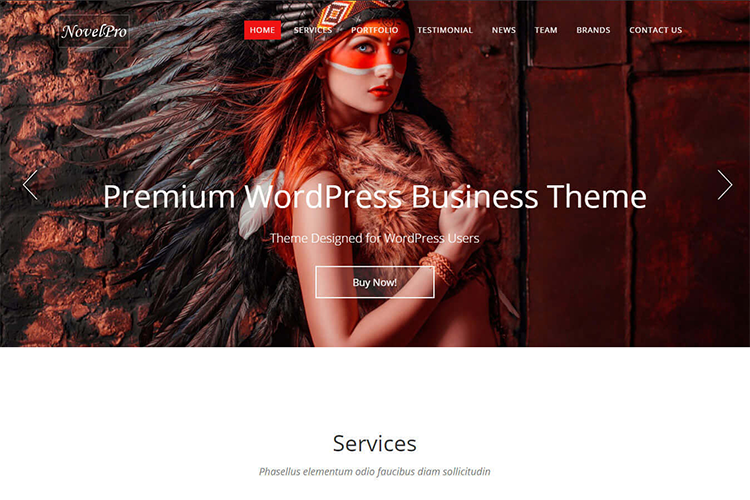
WordPress themes tend to be set up in similar ways, so once you get the hang of how to use one, you can easily adapt to others is you need to. But the theme of your website does set the tone so it’s important to spend some time looking into exactly what you want for your site. Make sure that it’s also mobile friendly too, as many people access the internet from their mobiles these days and you need to be sure that your site will still work properly for them. Take some time browsing sites such as Theme Planet and make use of their preview option to see how your site might look once you’ve got it all set up.
Making your site user-friendly
Once you’ve got your theme sorted, it’s time to start thinking about adding content that will draw the reader in.
Think about adding a sidebar to all of your posts so that you can add any important information there. You want your site viewers to be able to contact you easily, so an email address or contact form is a great idea here. You should also add social media icons so that your readers can follow you there too. Further down the line, you will be able to sell advertising space on your sidebar too.
You’ll need to decide whether you want to have a static homepage that always stays the same, or whether you want your latest blog posts to show up on your home page. I use a mixture of the two on my sites. My Money Cottage has a static homepage as I want visitors to know instantly what my site is all about, whereas I have a lifestyle blog that always shows up my latest blog posts on the homepage. If you’re setting up a website for a business, then a static page is probably the way to go.
Take some time to think about the colours you use carefully too. If you have brand colours already, then this is easy enough, but if not, then you can easily find suggestions for colour schemes through a Google search.
Building websites is something I love to do, and it’s a great way to make extra money. It really doesn’t need to be all that complicated, but you do need to have a basic understanding of how the whole thing works. Once you’ve got your head around installing themes and using WordPress, you’ll be able to create lots of content and draw in readers pretty quickly. If you enjoy doing this then you could even start your own side hustle building websites for other people too – the possibilities are endless with this one.
*This is a collaborative post.


