
Enhance your child’s learning with Calculators.org
I don’t know about you, but I’m finding it really tricky at the moment to keep the children engaged in their learning at home during this pandemic whilst also trying to work from home myself! It’s a constant juggling act and I don’t think there’s a day that’s gone by so far where something or someone has been neglected.
All three of my children have had work set by their schools, but there have been plenty of days when they’ve just not wanted to do what’s been set. It’s not that they don’t want to learn, or they can’t be bothered, but they just haven’t been engaged with the work they’ve been asked to do. On those days, we’ve been trying out other learning resources online and that’s worked really well.
Calculators.org free games
One of the great things about the Calculators.org site is that you don’t need to create an account and sign in to be able to use the games. You can just head straight to the site and dive straight in. It’s perfect when the kids just want something quick to access.
There’s a really good range of maths games available, from straightforward quiz type questions, through to more game-style options.
As my kids like to learn through play, they prefer the games. I’ve picked a couple of our favou
Math Boy

Math Boy is one of our favourites. In this game, you have to solve problems in order to fight off the monsters (or bad guys as my youngest calls them). It turns learning into a really fun time!
You can make it more difficult by choosing multiplication or division at the start of the game.

My children love challenging each other by choosing the operation for each other and seeing who can get the highest score. If you get the answer right, you defeat the monster. Get it wrong and the monster attacks and it’s game over.

Quick Math

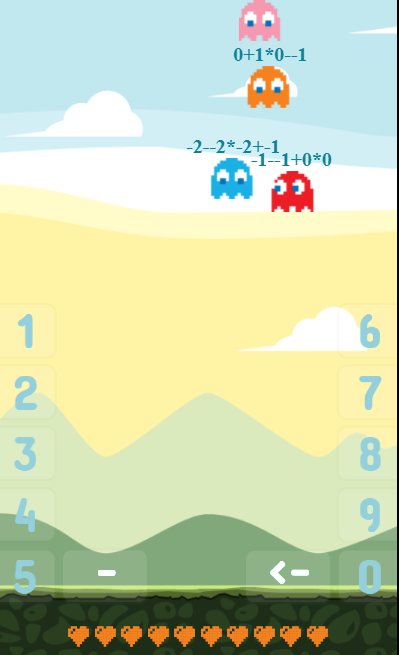
We also love the Quick Math Practice Game. With this one, you can opt for the beginner level for younger ones or make it harder for the older ones. You have to hit the right numbers and mathematic operators in order to shoot the monsters, it’s great fun! You get 10 lives which is ideal for little ones who might not always deal too well with losing.
For the beginner level, you just need to hit the right numbers as the monsters fall down, either on your keyboard or my clicking the numbers on the screen. So in this example below you’d have to hit 73, 9, 31, 57 and -33 to shoot down all the monsters.

You can easily see from the next screenshot just how hard this game can get when you opt for the Nightmare level – the hardest level available. This would be ideal for older or more advanced kids to challenge their speed and reaction time.
If you’re looking for a fun and unique way to get the children engaged in some learning then this site is a great place to find fun games for all levels. Have a try and let me know your favourite!