
Using fonts to make your blog stand out

One of the ways I make money online is through blogging. My Money Cottage has always been my main blog, but I do have a number of other sites too. I make money from these in a number of ways – sponsored content, paid adverts and affiliate income being the main ones.
The thing I’ve found with all of my blogs is that the only way to make them work is to make them look good. This might sound obvious, but you’d be amazed at the number of people who just create content, whack it up on their site and hope for the best. Now, if this works, then great! But I’ve found that taking the time to make my blogs look unique and interesting really does help them to gain readers and attract more work.
One of the easiest ways to make your blog really stand out without spending hours on colour schemes and browsing through hundreds of themes is to add a font plugin. Font plugins pretty much do what they say on the tin – they allow you to quickly and easily change the font on your blog, giving it an instant refresh.
There are a number of free font plugins available for WordPress blogs, I’ve chosen just five of my favourites.
1. Fontsy
The Fontsy WordPress Plugin is fairly new, but it’s quickly become one of my favourites. As with many plugins, they have both a free option and premium fonts that you have to pay for.
One of the great things with Fontsy is that they’ve got a huge range of fonts and they have some suggestions of fonts that work well together too, making it really easy for you.

It’s really simple to use Fontsy, and you can easily choose which fonts appear where – so you could have a different font for each type of heading and another for your main paragraphs.

2. Use Any Font
As with many other font plugins, Use Any Font is free to use initially, with a paid option if you decide to use more than one of their customised fonts.
The main positive with a plugin like Use Any Font is that it’s really simple to use. Once you’ve installed the plugin, it’s pretty much a case of click and go. You will just need to choose your font and you’re ready to start writing.
The biggest downside of this plugin, in particular, is that you’re limited to only one font unless you’re happy to pay for premium access, so this won’t suit every user. Still, it’s worth a look regardless.
3. Easy Google Fonts
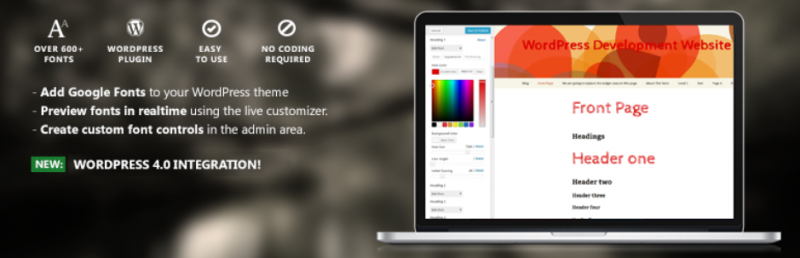
This is perhaps the most well known of the font plugins right now. As with anything produced by Google, it’s pretty user friendly which makes it a great option for those of us who are slightly less tech-savvy than we’d like to admit!
The beauty with this one is that it integrates with WordPress Customizer, so you can preview how your fonts will look on your site.
4. Fonts
The Fonts plugin adds font options directly to the WordPress Visual Editor, so it’s really easy to chop and change fonts.
As with others, there is a free option with a selection of fonts available, and then a premium version if you decide you need extras.

5. Custom Fonts
Custom fonts allows you to easily upload your custom fonts to your WordPress site. It’s really easy to use, you just install, activate and then you’re free to upload fonts in a variety of formats.
The downside with this plugin is that it currently only works with a number of themes, so be careful to check that it’s compatible with your WordPress theme before you install.
In conclusion, making your blog stand out is really important if you want to be noticed and remembered, but it doesn’t need to be difficult! Simply installing one of these plugins will make it really quick and easy and have a huge impact on your blog.
*This is a collaborative post.